
Claude Duet
Prepare a meeting brief.
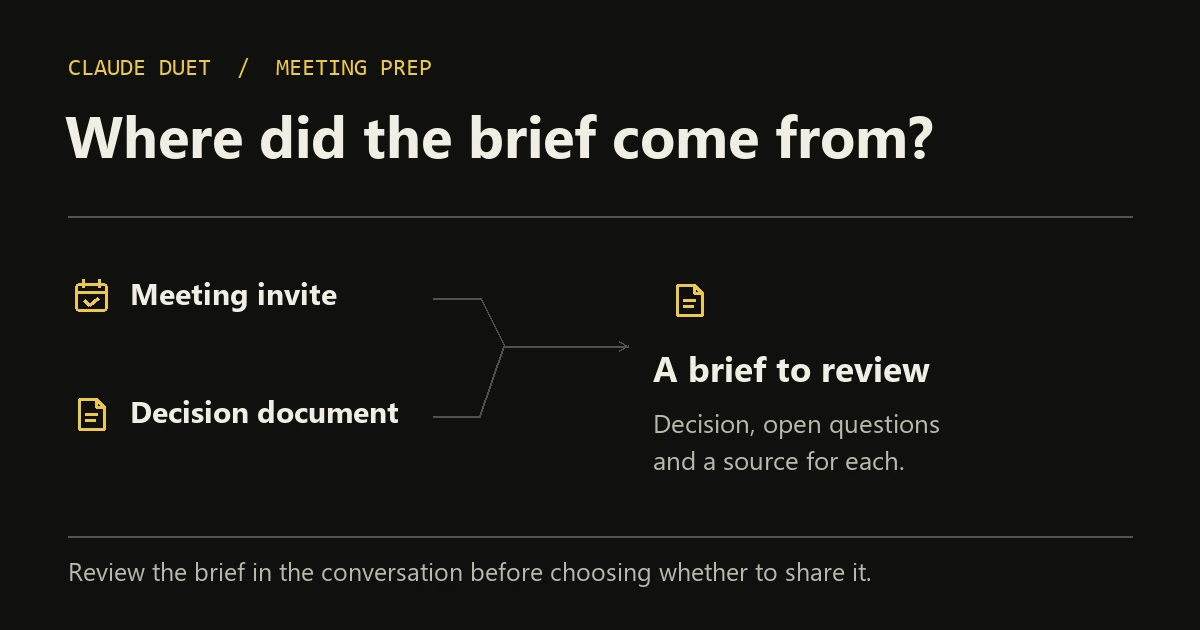
Give Duet the calendar invitation and the documents behind one decision. Ask for a private brief, check the sources and choose what to share.
Updated
Claude Duet is a proactive work assistant from Anthropic. It can read a connected calendar and prepare for an upcoming meeting on its own cloud computer. Its output comes back to an ongoing conversation, where you can correct its assumptions or decide what to send.
Check access and choose one meeting#
Anthropic lists Duet as a US research preview for invited Pro, Max, and Ultra subscribers. Start at the Duet product page to request access. Use the Claude account on your invitation when you sign in. Anthropic’s access guide covers current availability and plan eligibility.
- Pick a meeting with a clear purpose. A design review attached to one calendar entry and one decision document works well.
- Check which connectors are already enabled in Claude. Duet inherits access to your connected apps. The meeting invitation and the linked document are enough for this exercise.
- Ask, “Prepare a brief for Thursday’s design review. Include the decision we need, the two open questions from the linked document, and the source of each. Keep it in this conversation for my review.”
- Read the brief alongside the invitation and document. If it offers to contact the other attendees, review the recipient and the message separately.
See Anthropic’s Duet interface examples on the App Store
A brief you can trust enough to use#
Check whether Duet distinguished a decision already made from a proposal that still needs a vote. Follow one citation and check its date. If the document is unavailable, ask Duet to identify the missing input and keep the gap visible. A plausible sentence with no source is a poor substitute for what the meeting owner actually agreed.
Duet can continue work after you close the app. Connecting an account gives it an ongoing source of context. Disconnecting the app stops future access, while details Duet learned from earlier conversations can remain in memory. For changing and testing the software in a repository, Claude Code has a workflow built around files, commands, and diffs.
Related#
 What are AI bots, and what can you actually leave them to do? · ContenoxChoose between hosted, desktop and self-hosted AI bots. Try a two-run release digest to check memory, scheduling, permissions and delivery.
 AI bots vs. coding harnesses: which runs the job? · ContenoxCompare a persistent AI bot with a coding harness using the same release feed. See who keeps time, what state survives, how permissions work and what proves the task is done.