Your first chain
The agent’s behavior — system prompt, model, tool policy, retries, when to branch, when to pause — is a JSON file you write. The engine runs what you wrote. This page walks you from a blank file to a working chain in five edits.
If you haven’t installed Contenox yet, do the Quickstart first.
Workspaces
contenox init creates or refreshes two kinds of state:
A project-local workspace marker — .contenox/workspace.id in the current directory. This is like .git/ — it marks this directory tree as a Contenox workspace. The engine walks up from your current directory looking for this marker to resolve which workspace you’re in.
Global runtime files — ~/.contenox-harness/ stores everything that’s shared across workspaces: default chain presets, HITL policies, pulled models, and the SQLite database.
~/.contenox-harness/                    ← global (shared across all workspaces)
├── local.db                    ← SQLite: backends, config, sessions, MCP registrations
├── models/                     ← GGUF model files (populated by `contenox model pull`)
├── default-chain.json          ← the interactive chat chain
├── default-run-chain.json      ← the one-shot pipeline chain
├── hitl-policy-default.json    ← default HITL policy
├── hitl-policy-strict.json
├── hitl-policy-dev.json
├── hitl-policy-acp.json        ← editor (ACP) sessions
└── hitl-policy-acpx.json       ← headless / untrusted-driver (ACPX) sessions

./my-project/.contenox/         ← project-local workspace marker
└── workspace.id                ← unique workspace ID
To make any directory a workspace, run contenox init inside it. Workspace-scoped config (like default-chain and hitl-policy-name) is stored per-workspace in the SQLite database. If you place a chain file in the workspace .contenox/ with the same name as a global preset, the workspace file wins.
What contenox init already gave you
Look in ~/.contenox-harness/. You’ll find two chains the engine ships with:
default-chain.json— the interactive chat loop, used bycontenox chatand by a barecontenox "..."(a bare prompt is session-backed chat, not a stateless run)default-run-chain.json— the one-shot, stateless pipeline loop, used only bycontenox run
The second one is a real authored chain: a main agentic loop with a 10-round budget, a recovery loop with another 10 rounds, and a final summarise_failure task that runs when both budgets are exhausted. Tool allowlists, retry policies, edge-traversal counters — every decision is a JSON key.
You don’t have to start there. You can write your own.
Chains live as files in ~/.contenox-harness/ (and your workspace .contenox/); the
CLI picks one per invocation with --chain, or falls back to the configured
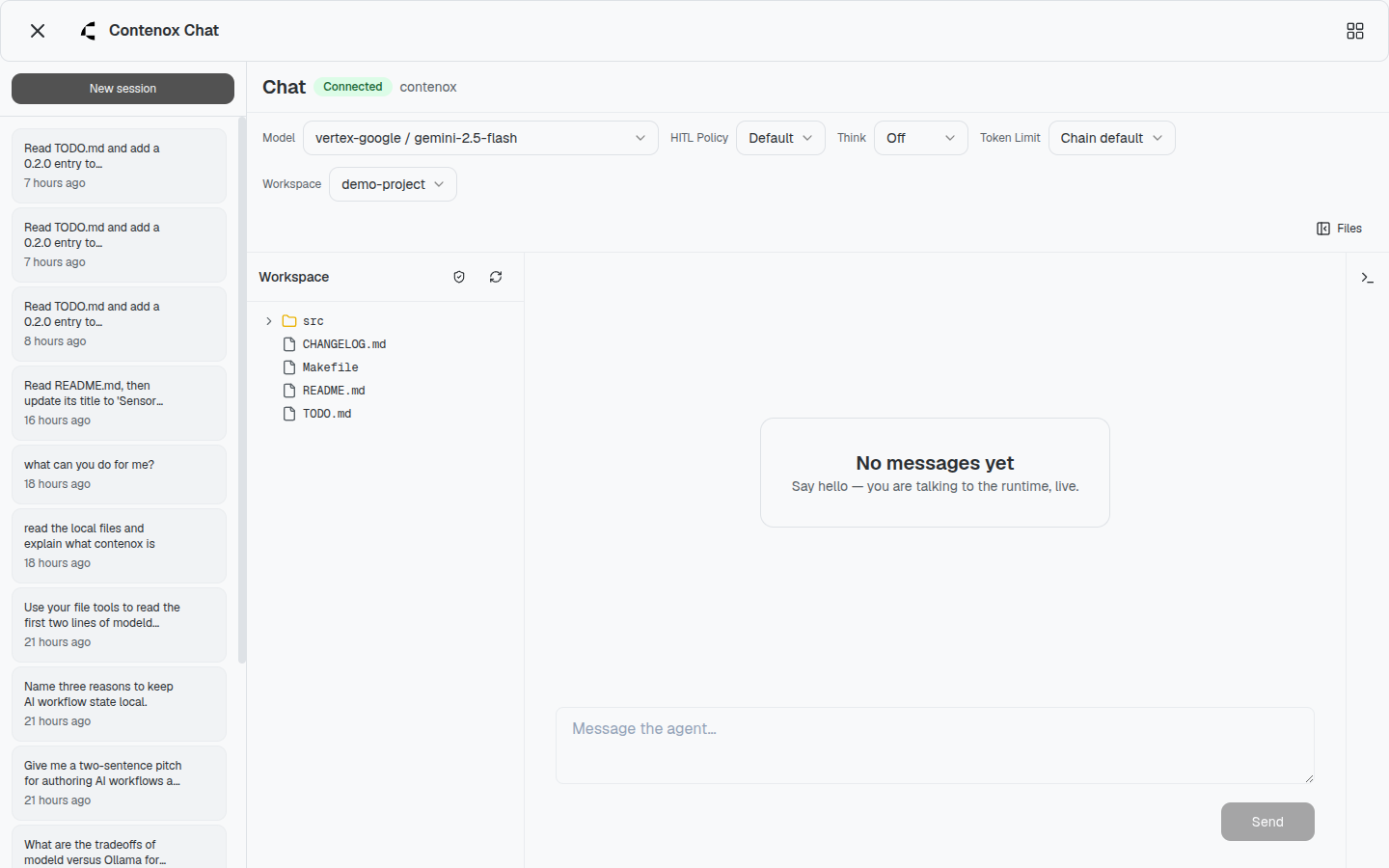
default-chain. Sessions in the Beam UI (contenox serve) run the workspace’s
default chain, with the model, HITL policy, and reasoning effort switchable per
session:
A minimal chain
Create ./my-chain.json:
{
  "id": "my-chain",
  "tasks": [
    {
      "id": "answer",
      "handler": "chat_completion",
      "execute_config": {
        "model": "qwen2.5:7b",
        "provider": "ollama"
      },
      "transition": {
        "branches": [
          { "operator": "default", "goto": "end" }
        ]
      }
    }
  ]
}
Run it:
contenox run --chain ./my-chain.json "what is the capital of France?"That’s the smallest working chain: one task, one default branch out. Now we’ll author behavior into it.
Edit 1 — Set a system prompt
Add system_instruction to the task. This is the agent’s persona for this chain — it lives in your file, not in vendor code.
{
  "id": "answer",
  "handler": "chat_completion",
  "system_instruction": "You are a terse senior engineer. One sentence answers. No preamble.",
  "execute_config": {
    "model": "qwen2.5:7b",
    "provider": "ollama"
  },
  "transition": { "branches": [{ "operator": "default", "goto": "end" }] }
}
The agent now answers in your voice, not the model’s default voice.
Edit 2 — Pick the model (and a fallback)
execute_config.model and execute_config.provider choose the backend. Use models[] and providers[] to author a fallback policy — the engine tries them in order. The execute_config block on the task becomes:
{
  "execute_config": {
    "models": ["qwen2.5:7b", "gpt-4o-mini"],
    "providers": ["ollama", "openai"],
    "temperature": 0.2
  }
}
Authored resilience: when the local model is down, you fall back to OpenAI. You picked the order; the vendor didn’t.
See the providers guide for backend setup.
Edit 3 — Branch on the output
A single task is a function call. A chain becomes interesting when it branches. Add a second task and route to it conditionally.
{
  "id": "my-chain",
  "tasks": [
    {
      "id": "classify",
      "handler": "route",
      "system_instruction": "Classify the message urgency. Respond 'urgent' or 'normal'.",
      "execute_config": { "model": "qwen2.5:7b", "provider": "ollama" },
      "transition": {
        "branches": [
          { "operator": "equals", "when": "urgent", "goto": "escalate" },
          { "operator": "equals", "when": "normal", "goto": "respond" },
          { "operator": "default", "goto": "respond" }
        ]
      }
    },
    {
      "id": "escalate",
      "handler": "chat_completion",
      "system_instruction": "This is urgent. Draft a one-line page to on-call.",
      "execute_config": { "model": "qwen2.5:7b", "provider": "ollama" },
      "transition": { "branches": [{ "operator": "default", "goto": "end" }] }
    },
    {
      "id": "respond",
      "handler": "chat_completion",
      "system_instruction": "Reply briefly and helpfully.",
      "execute_config": { "model": "qwen2.5:7b", "provider": "ollama" },
      "transition": { "branches": [{ "operator": "default", "goto": "end" }] }
    }
  ]
}
You authored the labels (urgent / normal) and the routing — the route set is just the branches you can read. See Transitions & branching for all available operators (equals, contains, starts_with, ends_with, edge_traversed_at_least, default).
Edit 4 — Constrain the tool policy
If the task uses tools, you author the policy. Allowlists, denylists, per-tool config — every constraint is a key.
{
  "execute_config": {
    "model": "qwen2.5:7b",
    "provider": "ollama",
    "tools": ["local_shell", "local_fs"],
    "tools_policies": {
      "local_shell": {
        "_allowed_commands": "ls,cat,grep,git",
        "_denied_commands": "sudo,rm,dd"
      },
      "local_fs": {
        "_max_read_bytes": "1048576"
      }
    }
  }
}
The vendor didn’t decide what local_shell can run on your machine. You did.

Edit 5 — Add a retry policy
Transient failures shouldn’t kill a CI step. Author the retry behavior in the chain:
{
  "execute_config": {
    "model": "qwen2.5:7b",
    "provider": "ollama",
    "retry_policy": {
      "max_attempts": 4,
      "initial_backoff": "1s",
      "max_backoff": "30s",
      "jitter": 0.25,
      "rate_limit_min_wait": "10s"
    }
  }
}
Combined with transition.on_failure, you control exactly what happens when something goes wrong — retry, route to a recovery task, or escalate. The pause, the retry, the rerouting: all yours.
You authored an agent
That’s it. You’ve written:
- A system prompt
- Model selection with a fallback policy
- Branching with a numeric operator
- A tool policy with allowlists
- A retry policy with backoff and jitter
This file works against Ollama, OpenAI, Gemini, or vLLM by changing one config line. It works on your laptop today; the same artifact runs on Contenox Services tomorrow without modification.
Next
- Annotated examples — four longer chains, fully commented
- Handlers reference — every available task type
- Transitions & branching — operators, edges, and
on_failure - Use cases — end-to-end recipes for real workflows