The AI agent approval workflow I trust is the one where an agent nobody is watching can reach a person through exactly one place: the inbox. It holds three kinds of thing: a question, an approval, or a finished result. Nothing else interrupts you, and nothing else can answer for you.
I built that inbox for one person on one machine, then again as a hosted web app for teams. This is what the second one looked like, what went wrong in it, and what it taught me.
The rule underneath: a row first, a screen second
When a tool call hits an approve rule, the engine does not draw a prompt. It writes a durable row, checkpoints the run, and only then lets a surface render the row. The prompt is one view of it.
That order is the whole design, and three things follow from it:
- A crash loses nothing. The ask is already on disk, so a restart finds it still pending.
- The verdict is recorded once. A row becomes final exactly once, by compare-and-swap. If two people tap Allow at the same moment, one write wins and the other is told it lost.
- The run resumes exactly once. The verdict lands on the row, the checkpoint picks it up, and the agent carries on from where it stopped. It does not matter whether the answer came from a terminal, an editor, or a phone three days later.
What an ask is, and the states it shows
An ask is a row with a title, the agent, the machine, the call that was stopped, the rule that stopped it, and a deadline. If nobody answers by the deadline, the ask is refused. The engine rejects a policy where silence means “allow”, so a forgotten ask can only fail closed.
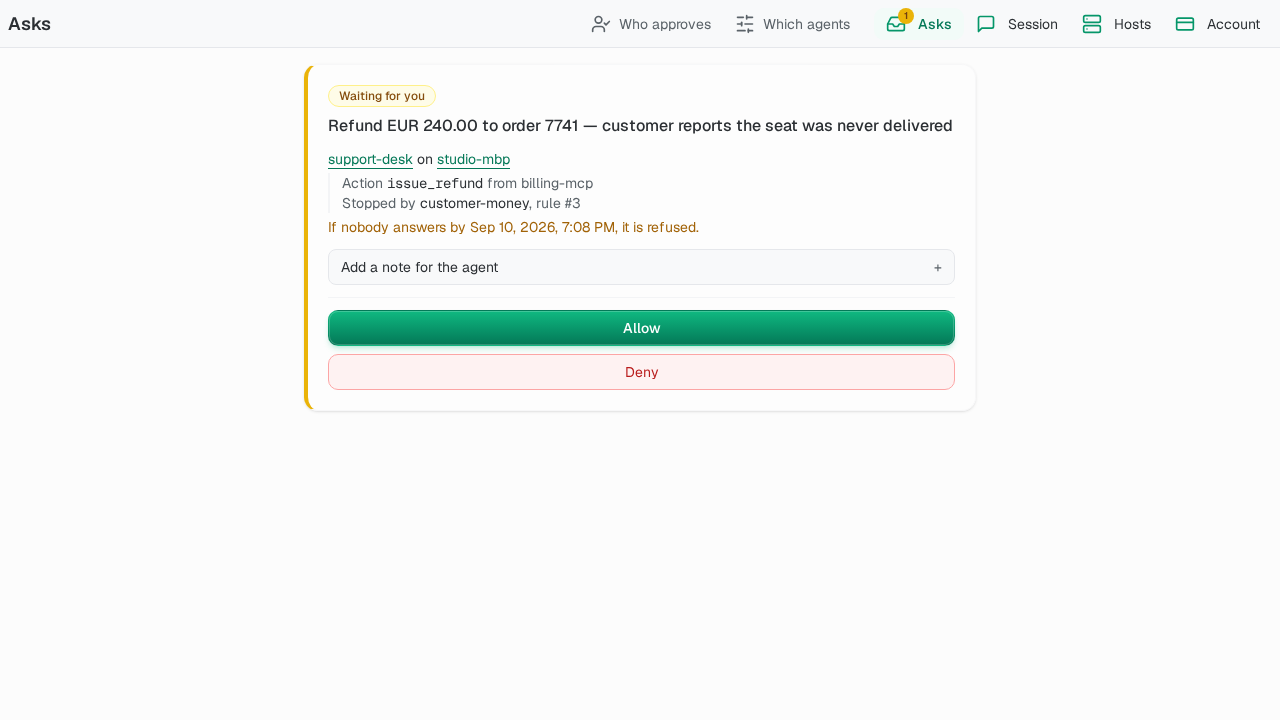
That is the waiting state. The card names the exact call (issue_refund, stopped by a rule called customer-money) and offers two buttons. The refund is a fixture from the app’s test catalogue, not a customer. A question card looks the same, except it has a text box instead of Allow, because the agent is asking what to do, not asking to be let through.
The states I ended up designing screens for:
| State | What the card says | Why it exists |
|---|---|---|
| Waiting | Allow and Deny, or a text box | The normal case |
| Answered here | What you decided, kept on screen | So your own confirmation never vanishes |
| Answered elsewhere | ”Answered somewhere else.” | Another person or surface got there first |
| Restricted | ”Only an owner of this account can answer this.” | The rule names a role you don’t have |
| Suspended | ”Nothing has been sent to the machine. The ask is still open on it.” | The account cannot answer right now |
| Expired | The machine stopped waiting | The deadline passed |
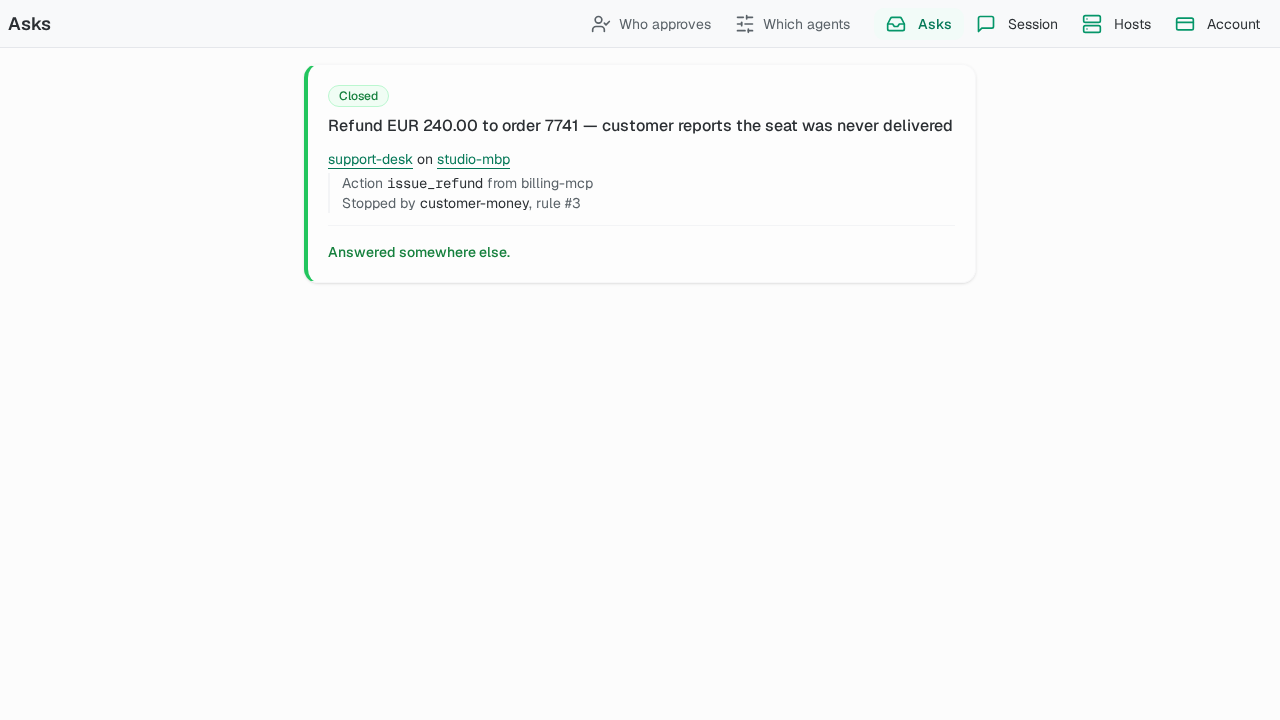
The relay drops a settled ask from its list the instant it settles. A naive screen then removes a card while you are halfway through deciding on it, and says nothing. So the app keeps the card, marks it with how it closed, and holds it until the page reloads. A closed card you were reading beats a missing one.
One subtle case: when you tap Allow, the machine closes the row and sends “answered” back a beat after your own confirmation. If the screen believed that message, it would replace “Allowed, the agent is going ahead” with “Answered somewhere else” on the one card that is about you. Your own verdict wins over the echo of it.
Who may answer: rules per member and per agent
Anyone can be asked. Not everyone should count. Two settings decide it:
- Which agents may interrupt you. A subscription names an agent, not a machine, so it covers every machine the team owns for that agent.
- Approval rules. How many different people must approve before the machine is told, and which role counts. An account-wide rule applies unless an agent has a rule of its own. Only an owner or an admin can change one.
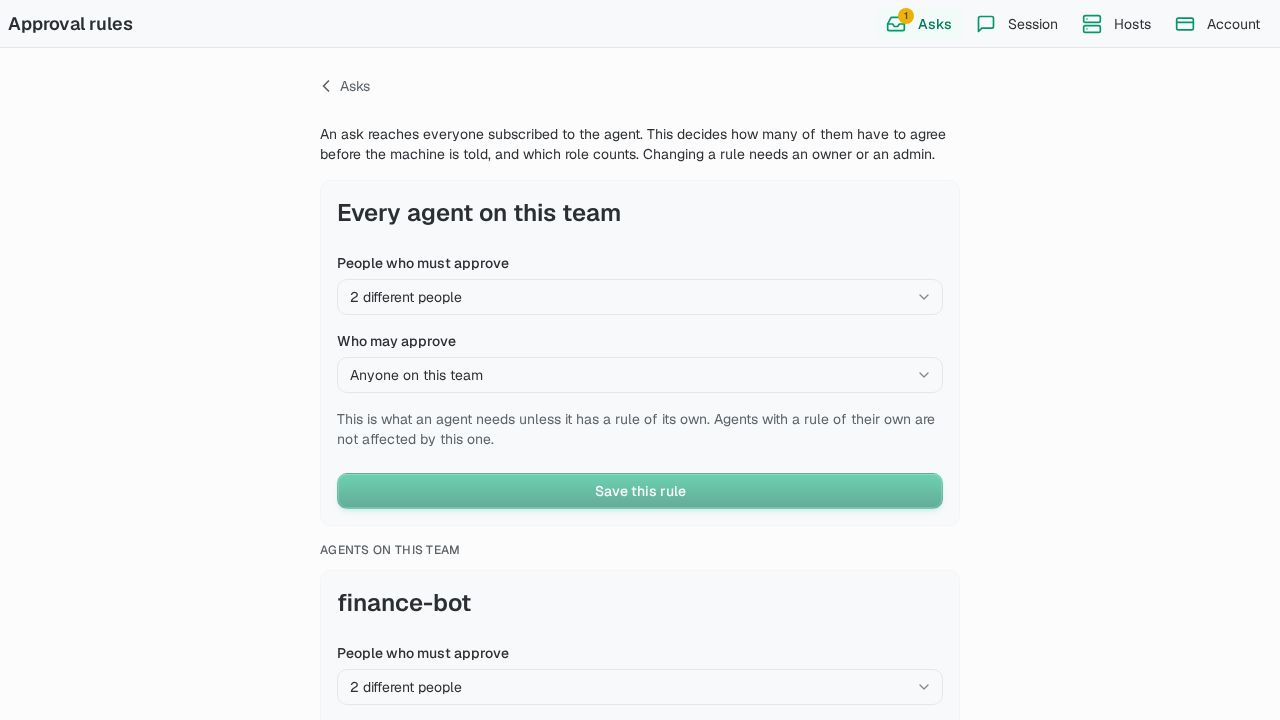
The sample asks for two different people. An answer that only counts toward a quorum is shown as yours, not as done, so nobody thinks one tap released the money. And the card never offers a button that is certain to be refused: a control that fails with a 403 is worse than a sentence saying whose job it is.
When the machine is gone or quiet
The agent runs on a paired machine, not on the relay. The relay carries asks between that machine and your browser and never stores them. The screen says so.
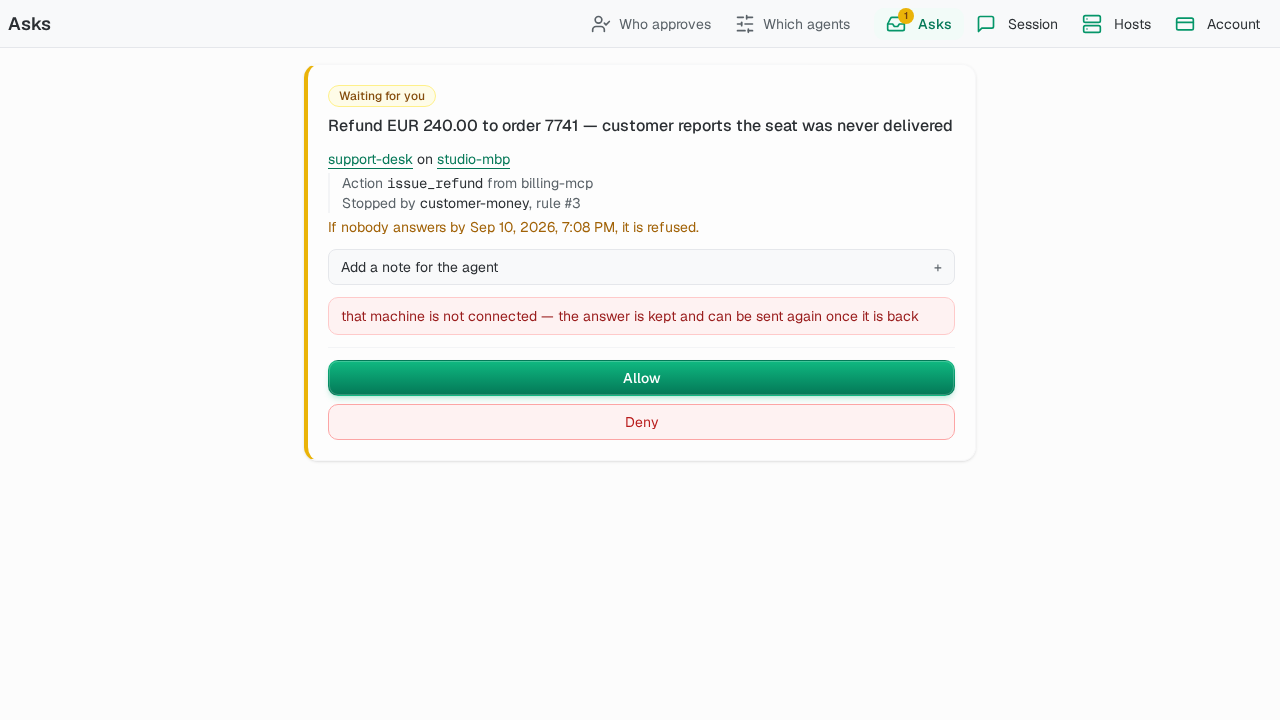
Three consequences:
- An offline machine shows no asks. The row lives on the machine. When it reconnects it republishes its open asks, newest first and bounded, so a machine holding more than the limit brings back only the newest.
- An answer to a machine that is not connected is kept. The card says so: the answer is kept and can be sent again once the machine is back. Nothing counts as applied until the machine confirms it.
- A closed laptop is not a stuck run. The run checkpoints beside the pending row. Answer later, from any process that can reach the models, and it resumes where it stopped.
A host that disconnects is a failed observation. It is not evidence that the work stopped, finished or is still running.
The billing states that gate asks
Asks sit behind a subscription, so billing can stand between you and an answer. Three states, and the difference matters:
- Grace. A payment failed and is inside its retry window. Entitlement is kept and every card still answers normally. A banner says “A payment failed” and offers the billing page to an owner or admin. A member sees who can fix it.
- Lapsed (on hold). The entitlement is already dropped, and the relay refuses every answer with a 403.
- Suspended. An operator suspended the account. That is separate from billing, so the card says so and mentions no invoice, because paying is not the remedy.
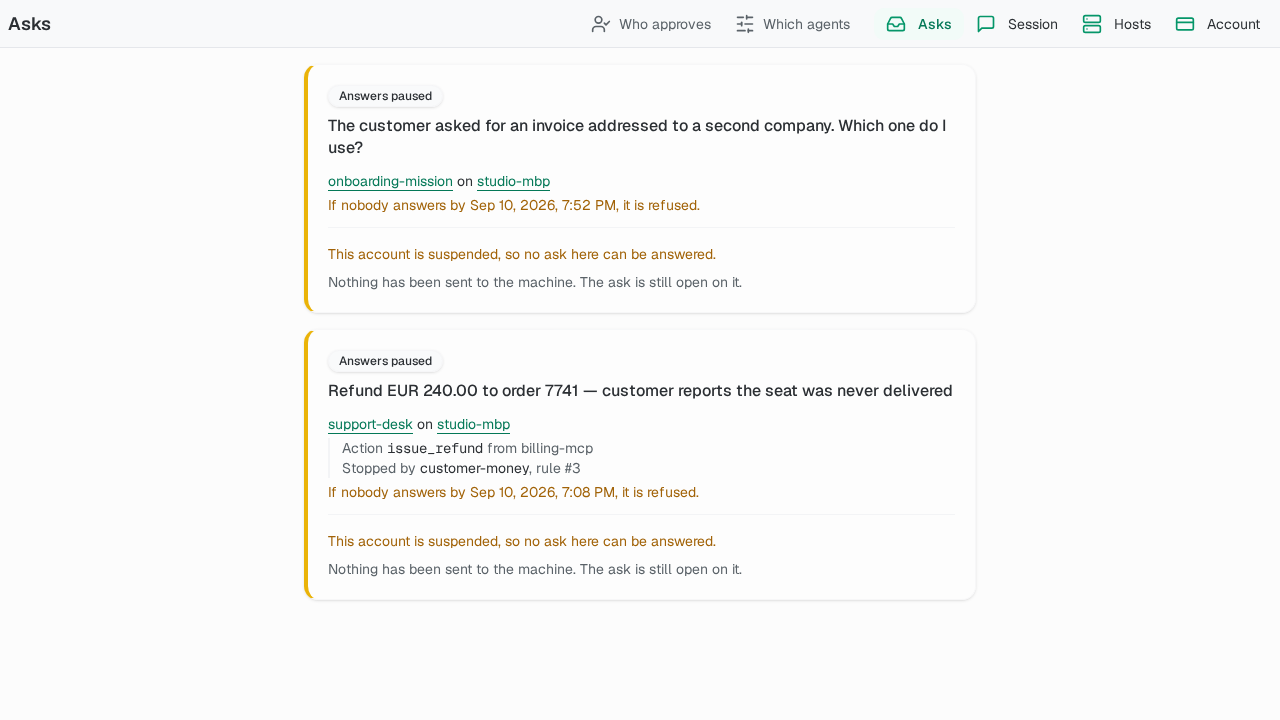
The silent 403 trap: my first answer to a lapsed account was a dismissible banner above a column of Allow buttons. Every one of them answered 403 and said nothing. The banner can carry the remedy, but the card itself has to say it cannot be answered, and offer no button.
The attention oracle: the part that answered for me
Unattended agents stall. You start a run, walk away, and come back to one waiting on a question its own instructions already answer. So I wrote a small second agent, the oracle, whose only job was to read each ask and rule on the routine ones: answer or wait for a question, and optionally approve, deny or wait for a gated call.
It had one tool and one verdict. wait was always safe, and every resolved row recorded who decided it, so an oracle verdict was never anonymous. It could only be faster than a person, never more permissive than the rule. Its budgets were durable: by default it could answer 3 questions and decide 20 gated calls per mission before the rest waited for a person, and 0 did not mean unlimited.
I removed it on 2026-08-14, about a thousand lines, and brought it back the same day. I was half right.
Right about questions. An agent that raises enough routine questions to need a filter has a vague intent. The fix is a sharper intent, not a second model reading the overflow. Routine questions are a symptom.
Wrong about gated calls. A subagent hitting an approve rule is the rule working as designed. No better policy removes that interruption, because the only way is to move the call to allow, which is the blanket permission you declined to grant. Only a per-call judgment can decide it.
The end-to-end test that made me remove it did find real bugs, none of them in the oracle. A “fire it and walk away” command did not return when a run parked. A parked ask was swept to its timeout verdict instead of being held. A read-shaped list command silently resumed stranded runs. The oracle was answering inside a broken flow.
It also cost one model call per ask reviewed, including the ones it declined to decide.
Where this lives now
The hosted web app is archived. What I kept is the part that mattered: the Contenox roadmap, written 2026-11-01, names the inbox as one of three things an unattended agent is built around, next to missions and a fleet view, and describes it as the only place an unattended agent can reach you. Envelopes, the rules for what an agent may do, are the other half. The current cycle includes a badge count on the inbox. OS notifications for “needs you” are listed as next, not shipped.
About the hosted product itself, honestly: it was never marketed, so I have no signal about demand either way. The billing states above were built and tested in advance, as insurance, and never charged anyone. What ended it was the relay: WebSockets between every paired machine and every browser did not scale the way I needed, and I did not want to be the proxy for everyone’s traffic. The parts worth keeping, the event-driven workflows among them, are being harvested into the desktop app.
The team half of that build, shared files, shared chats and per-member billing, is in AI agent platform architecture.
What this does not solve
- A person still has to answer. The inbox makes an ask durable and answerable from anywhere. It does not make anyone read it before tapping Allow. Approval fatigue is a human problem, and a phone makes it easier to tap through.
- The oracle is a model. It judges a call against an intent. A vague intent gets vague rulings, and a rule you never wrote cannot be enforced by a reviewer.
- Failing closed is still a stop. A refusal on timeout is safe, and it can also leave a mission halted overnight over a question a person would have answered in ten seconds.
- It records who decided, not whether they were right. I never measured how often the answers were correct.
Contenox
The desktop app puts the same idea on one machine: the agent works in your project, and what it may do without asking is a set of rules you can read. Download it for Windows.
Related guides
- AI agent permissions: the allow, ask and block rules that decide what reaches the inbox
- AI agent platform architecture: the team half of the hosted build
- YOLO mode: what skipping the inbox costs
- Why does my coding agent keep asking for permission?: the same gate, from the other side