You can use your GitHub Copilot subscription outside of VS Code. OpenCode signs in with your GitHub account and runs on your Copilot plan, OpenAI’s Codex extension offers “Sign in with Copilot” on the higher plans, and Contenox offers the same sign-in once you turn on Allow unofficial sign-ins in its settings. GitHub has not approved Contenox for Copilot, so GitHub may block that sign-in or limit your account. Usage draws on your plan’s AI Credits, like Copilot chat does.
Use your Copilot subscription with your agent
| Agent | Supported? | How | Note |
|---|---|---|---|
| Claude Code | No | Claude Code runs on Claude accounts and cloud platforms, not on Copilot. | |
| Codex | In the VS Code extension | Sign in with Copilot in the Codex extension | Copilot Pro+ and Max only, according to GitHub. |
| OpenCode | Yes | /connect → GitHub Copilot, then enter the code at github.com/login/device | Some models need Copilot Pro+. |
| Contenox | Yes, after enabling unofficial sign-ins | Settings → Allow unofficial sign-ins, then Backends → Providers → GitHub Copilot | Not approved by GitHub; use at your own risk. |
OpenCode
Start opencode in your project and type /connect. Choose GitHub Copilot. OpenCode
shows a code; open github.com/login/device, enter it and
approve. Then pick a model with /models.
If a model you expect is missing or refused, check your plan: OpenCode’s docs note that some models need Copilot Pro+.
Codex
In the Codex extension for VS Code, choose Sign in with Copilot. GitHub’s docs limit this to Copilot Pro+ and Max subscribers, and say all usage is subject to GitHub’s rate limits and billing. The Codex CLI signs in with ChatGPT or an API key instead; see ChatGPT subscription.
How is it billed?
Since 1 June 2026, Copilot chat and agent use is billed in AI Credits, counted by the tokens a model processes. Expect use from another agent to count the same way: tokens against your included credits, and when they are gone, you pay for more within a budget you set, or wait for the monthly reset. There is no fallback to a cheaper model.
Agent sessions use far more tokens than chat, so they use credits quickly. See AI coding costs for why, and check your usage in your GitHub billing settings during the first days.
Code completions in your editor are not billed in credits.
GitHub’s own agents on your plan
Your Copilot subscription also pays for agents that run on GitHub itself, not on your computer: Copilot’s cloud agent, and in public preview the Claude and Codex coding agents. They work from an issue and come back with a pull request. These sessions use GitHub Actions minutes as well as AI credits.
Common problems
- A model is missing or refused: it needs a higher plan, often Pro+.
- Your organization’s plan doesn’t work outside VS Code: on Business and Enterprise, organization policies decide which agents and models are allowed. Ask your admin.
- Requests stop mid-month: your AI Credits are used up. Set a budget in your billing settings, or wait for the reset.
Contenox
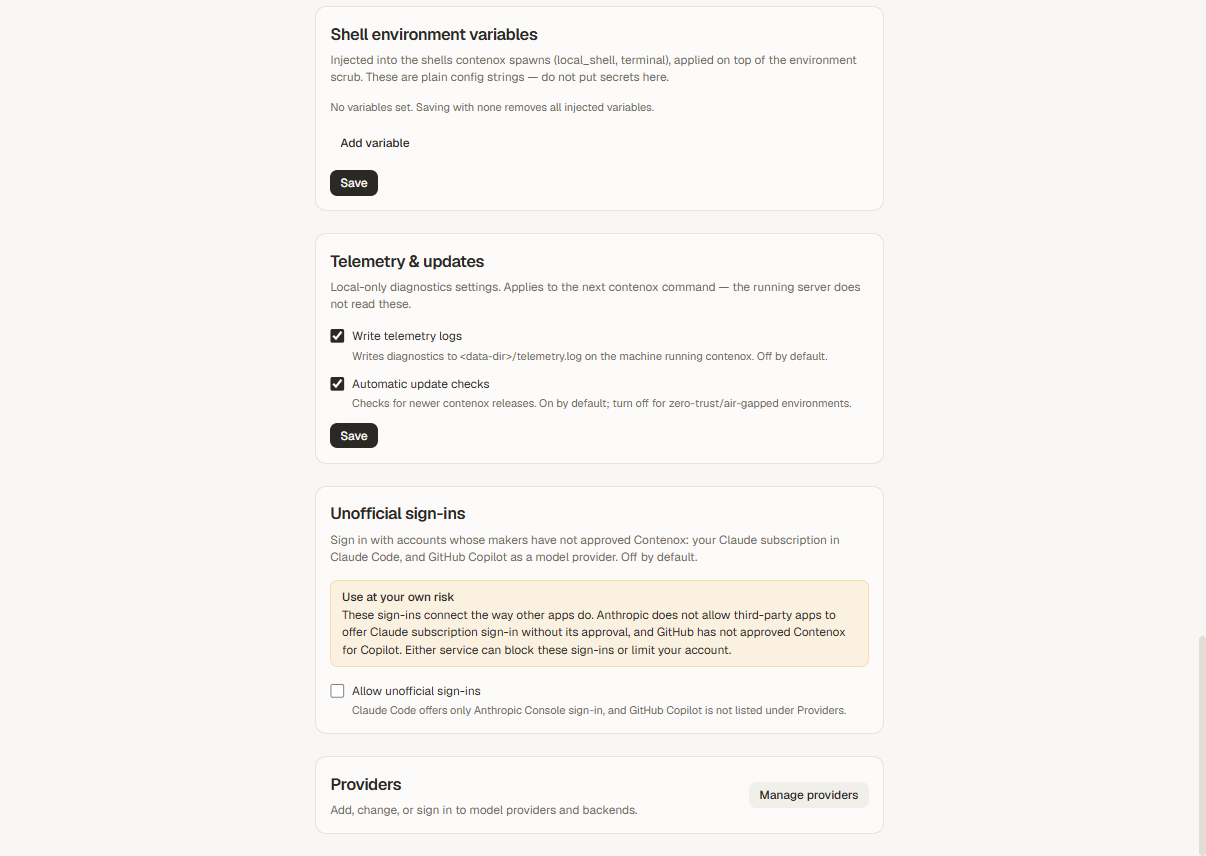
Contenox can sign in with your GitHub account and list Copilot’s models in the Model chip next to any other provider you connected. The sign-in is off by default, because GitHub has not approved Contenox for Copilot: the app labels it Unofficial · your Copilot plan, and GitHub may block it or limit your account.
-
Open Settings, find Unofficial sign-ins and turn on Allow unofficial sign-ins.
-
Open Backends → Providers and choose GitHub Copilot.
-
Sign in with GitHub in your browser and approve access.
-
Pick a Copilot model in the Model chip on the message box.
Related
- AI coding subscription comparison: Copilot next to ChatGPT, Claude and others
- Which AI provider for coding?
- GitHub Copilot alternative
- ChatGPT subscription
- AI coding costs